Introducing FrontPanel 6

FrontPanel 6 provides a plug-and-play USB interface, a unified SDK for firmware and host code, and a browser-based platform for app development. We handle the integration so you can go from design to a browser-ready, hardware-connected FPGA application in record time.

FrontPanel 6 application running on a laptop

What FrontPanel Does

Built for every stage of development

FrontPanel 6 covers the full development stack, from hardware communication to application deployment.

FrontPanel 6 stack diagram showing the FrontPanel API, Platform API, App Launcher, Firmware, HDL Modules, and User HDL components connecting a host computer to an FPGA development board
Your computer
USB 3.0
FPGA hardware

On your host computer

Develop in any language, cross-platform

FrontPanel SDK

FrontPanel API

A complete programmer's interface for building host applications that talk to FrontPanel-enabled hardware.

C++ Python C# Java Ruby
FrontPanel Platform

Platform API

Build polished browser apps in TypeScript and HTML, with direct access to your hardware. Cross-Platform, browser native, AI ready.

TypeScript HTML/CSS
FrontPanel Platform

App Launcher

A managed runtime for configuring devices and deploying Platform apps — run and update browser-based applications that talk directly to your hardware.

Runs on

Supported platforms: Windows, macOS, Linux, Android, Raspberry Pi

On your FPGA board

Pre-built firmware and HDL modules

FrontPanel SDK

Firmware

Pre-built firmware on the onboard microcontroller handles high-speed USB between your FPGA and the host PC. No low-level USB development required.

FrontPanel SDK

HDL Modules

Synthesizable HDL modules that drop into your FPGA fabric, exposing FrontPanel-compatible endpoints to the host PC.

Your Design

User HDL and hardware

Powering engineering teams from innovative startups to the Fortune 500

A grid of customer logos including Cirrus Logic, Intel, Maxim Integrated, Microchip, MIT, National Semiconductor, Qualcomm, Samsung, Sandia National Laboratories, Texas Instruments, Google, Microsoft, Agilent Technologies, and Analog Devices

System Architecture

How the FrontPanel stack fits together

A unified path from your host application to the FPGA — managed by FrontPanel, extensible by you. Build with the language you already use, and FrontPanel handles the USB, firmware, and HDL in between.

Where FrontPanel is Used

From first prototype to fielded product

FrontPanel 6 supports FPGA work across every stage — from first bring-up to shipped product.

FrontPanel iF logomark

Prototyping

Bring up new FPGA designs in minutes. Stream data over USB, drive registers from Python or C++, and iterate without writing low-level USB code.

Production

Ship browser-based Platform apps your team can run on any machine. Configure, calibrate, and test units on the line with a managed runtime built for the floor.

Education

Bring students hands-on with HDL and embedded systems. A unified SDK and a browser-based UI keep digital design approachable from the first lab.

Research & R&D

Capture high-throughput data and prototype custom instrumentation. USB 3.0 throughput and a scriptable API plug straight into your experimental workflows.

Test & Measurement

Build custom benches and automated test fixtures. Drive FPGA-based DAQ and signal generation with deterministic host-side control on every major OS.

Embedded & AI

Deploy AI-enabled FPGA accelerators with a browser-native host UI. Integrate inference pipelines and stream results through TypeScript and HTML.

Features

Cross-platform. Browser-native. AI ready.

FrontPanel works with the languages, browsers, and AI tools your team already uses — putting FPGA hardware development in reach of anyone on the team.

One API for every platform.

Drop the FrontPanel API into your project and talk to FPGA hardware in the language your team already speaks — on Windows, macOS, and Linux.

Windows macOS Linux

Ship apps in the browser.

Build interfaces in TypeScript and HTML with direct access to FPGA hardware. Chrome DevTools, source maps, and full reloading on every change.

TypeScript HTML / CSS No install

AI Ready.

Open your project in Claude Code, Cursor, or any AI-enabled IDE. Describe the change in plain language, watch the model edit your code, build, and ship.

Claude Code Cursor Copilot Chat

Coming Soon

The next wave of Opal Kelly hardware

FrontPanel 6 sets the stage for the next wave of Opal Kelly hardware: a new generation of USB 3.2 SuperSpeed+ products and a forthcoming AXI-based data port for streaming workloads. Leading the way is the SYZYGY‑HUB, a USB 3.2 Artix Ultrascale+ evaluation module for the SYZYGY peripheral ecosystem. More details in the coming months.

Sign up for the Hub launch list
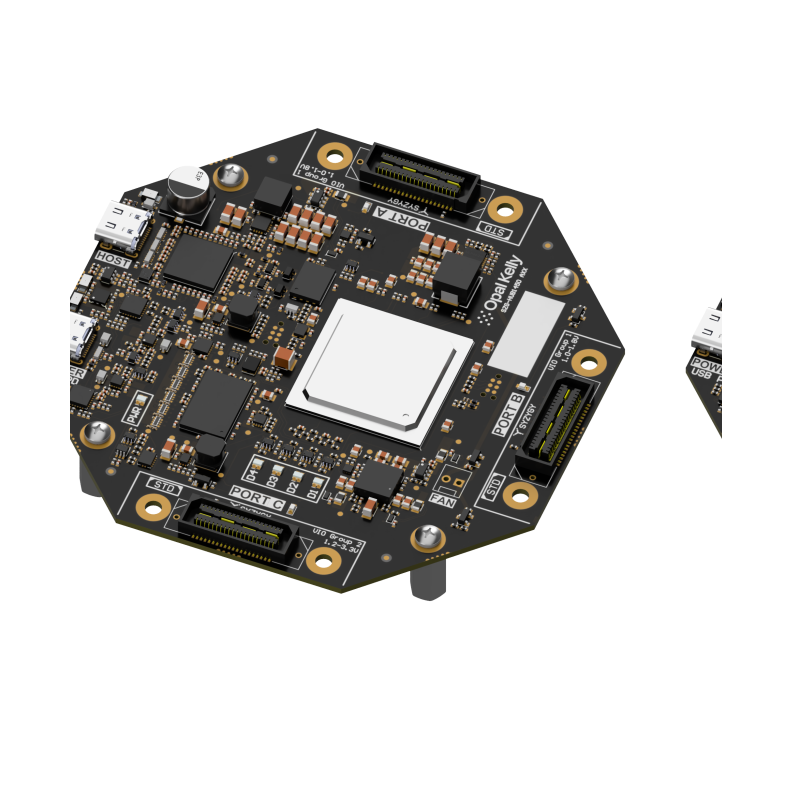
The SYZYGY‑HUB device — a USB 3.2 evaluation module from Opal Kelly

Technical Specifications

System Requirements, Tools, and Documentation

System Requirements

Officially supported operating systems and language libraries. Most other Linux distributions are known to work using the libraries from the officially supported targets below.

FrontPanel 6 — operating system and language support matrix. Lists officially supported targets with C/C++ compiler, Python, Java, Ruby, C#, and Platform availability.
OS C/C++ Python Java Ruby C# Platform
Windows 10, 11 (x64) MSVS 2022 3.9+ 21 Yes Yes
macOS 11+Intel and Apple Silicon Apple Clang 17 3.9+ 21 Yes Yes
Ubuntu 24.04 LTS (x64)Linux 6.8.0-48 gcc 13.3.0 3.9+ 21 Yes Yes
Ubuntu 22.04 LTS (x64)Linux 5.15.0-1013 gcc 11.4.0 3.9+ 21 Yes Yes
Rocky Linux 10.1 (x64, RHEL 10)Linux 6.12.0-124.8.1 gcc 14.3.1 3.9+ 21 Yes Yes
Rocky Linux 9.3 (x64, RHEL 9)Linux 5.14.0-472 gcc 11.5.0 3.9+ 8 Yes Yes
Raspbian 12.0 (ARM64 — Raspberry Pi, Bookworm)Linux 6.6.31 gcc 12.2.0 3.9+ 21 Yes
Other distributions
Many other Linux distributions are known to work using the libraries from the officially supported targets above.
Linux ARM
Available as needed; one-time ports available for a fee. For official ARM support, contact sales@opalkelly.com.

Build Tools & Simulation

Recommended FPGA toolchains for building configuration files, plus simulator and device requirements.

Xilinx ISE
Version 14.1i or later recommended For building configuration files: Spartan-6 and earlier
Xilinx Vivado
Latest version recommended For building configuration files: 7-Series and later
Altera Quartus
Version 15.0 or later recommended For building configuration files: Cyclone IV and later
Simulation
Compatible with most VHDL and Verilog simulators.
Hardware
An Opal Kelly FrontPanel-supported device is required.

FAQ

Frequently asked questions

What is FrontPanel 6?

FrontPanel 6 is Opal Kelly's complete FPGA development platform. It bundles a plug-and-play USB interface, a unified SDK for firmware and host code, and a browser-based platform for building applications that talk directly to FPGA hardware.

Which operating systems does FrontPanel 6 support?

Officially supported targets include Windows 10/11 (x64), macOS 11+ (Intel and Apple Silicon), Ubuntu 24.04 and 22.04 LTS, Rocky Linux 10.1 and 9.3, and Raspbian 12.0 on Raspberry Pi (ARM64). Most other Linux distributions also work using the libraries from those officially supported targets.

What programming languages can I use with FrontPanel?

On the host side: C/C++, Python (3.9+), C#, Java, and Ruby. The FrontPanel Platform additionally supports TypeScript and HTML/CSS for browser-native applications. The same FrontPanel API is available across every supported language and operating system.

Do I need to write low-level USB code?

No. FrontPanel 6 ships with pre-built firmware on the onboard microcontroller that handles high-speed USB between your FPGA and the host PC. You write your circuit design in HDL — FrontPanel handles USB, firmware, and the host APIs.

Can I build browser-based applications with FrontPanel?

Yes. The FrontPanel Platform API is a JavaScript interface for building polished browser-native apps in TypeScript and HTML, with direct access to FPGA hardware. The App Launcher provides a managed runtime that runs and updates these apps across Windows, macOS, Linux, Android, and Raspberry Pi.

What's the difference between FrontPanel SDK and FrontPanel Platform?

FrontPanel SDK provides the foundational pieces — the FrontPanel API, pre-built firmware, and synthesizable HDL modules. FrontPanel Platform is the browser-based development layer built on top, including the Platform API (TypeScript/HTML) and the App Launcher runtime.

Which Opal Kelly devices work with FrontPanel 6?

The full Opal Kelly product line: 8000-Series (XEM8370, XEM8350, XEM8320, XEM8310, XEM8305), 7000-Series (XEM7360, XEM7350, XEM7320, XEM7310MT, XEM7310, XEM7305, XEM7010, XEM7001), the ZEM Series (ZEM5310, ZEM5305, ZEM4310), the 6000-Series (XEM6310MT, XEM6310, XEM6006, XEM6110, XEM6010, XEM6002, XEM6001), plus legacy support for 5000- and 3000-Series devices.

What's the SYZYGY-HUB?

The SYZYGY-HUB is the next product in Opal Kelly's lineup — a USB 3.2 evaluation module for the SYZYGY peripheral ecosystem. Sign up for the Hub launch list to be notified when more details and availability become public.

FrontPanel®

The FrontPanel 6.0 Beta is now available. Try it now »
Block diagram

The FrontPanel SDK dramatically accelerates the development of your FPGA-based USB or PCI Express device by providing three essential components:

Icon: Software API

Software API and a robust driver to communicate with your device over USB or PCI Express.

Icon: Device firmware

Device firmware to manage FPGA configuration and communication.

Icon: FPGAoIP

Small FPGA IP blocks that integrate with your HDL to make host communication simple and easy.

Video Capture API

Multi-Platform FrontPanel API and USB Driver

Our robust USB driver and FrontPanel API work together to provide an easy-to-use software interface to your hardware that is consistent across the Windows (32-/64-bit), Linux (32-/64-bit), and Mac OS X development environments.Our PCI Express driver is available for Windows 32-bit and 64-bit operating systems.

And to make things even easier, we provide pre-built wrappers to the FrontPanel API for C, C#, C++, Python, and Java. And the DLL may be used from any of the huge library of software that support external calling such as Matlab and LabVIEW.

FrontPanel Application

Use our stand-alone FrontPanel Application for FPGA and PLL configuration, XML-based Virtual Control Components, firmware updates, general device setup, and more!

The stand-alone FrontPanel Application lets you quickly and easily define your own graphical user interface that communicates with your hardware. FrontPanel supports many virtual control panel components including:

  • LEDs
  • Hexadecimal displays
  • Sliders
  • Pushbuttons
  • Checkboxes
  • Toggle buttons
  • Numerical entry
Opal Kelly FrontPanel® desktop application
Interactive FrontPanel XFP Scripting

Interactive FrontPanel XFP Scripting

Bring new life to your FrontPanel XFP descriptions with scripting capabilities.

Attach scripts to FrontPanel components to perform event-based computations based on user-input or FPGA communication over wires, triggers, and pipes.

FrontPanel Scripting makes it easy to add business logic to XFP profiles so you can generate interactive interfaces to your hardware faster without having to implement user interfaces using C++ or Python.

Icon preprocessing

Perform preprocessing on numerical entries.

Icon format

Format outputs for human-readable display.

Icon evaluate

Evaluate and process data blocks from pipes.

Icon processing

Perform closed-loop processing.

Atomic HDL Modules

The HDL you build into the FPGA constitutes the interface between your instrument and USB. Integrate our intuitive HDL modules into your design and you have a fast, extensible, and simple conduit between your hardware and your software.

Simulation Models

Save hours of development time by specifically targetting components of your design rather than iterating in the dark. Our HDL simulation models describe the behavioral function of the PC to FPGA interaction and work under Xilinx’s iSim, Modelsim, and other HDL simulators.

Custom Interfaces and Test Hardware

FPGA technology is used in a wide variety of in-house prototypes and other custom projects. These types of projects benefit from both FrontPanel’s easy-to-use virtual interface components as well as the convenience and predictability of the FrontPanel programmer’s interface.

For Students and Educators

FrontPanel is perfect for use in many classroom settings. It’s flexible ease-of-use encourages exploration and makes it possible for students to realize their experiments and projects faster.

In structured courses, educators can setup template interfaces in FrontPanel XML, easing the student’s learning curve while standardizing the way students interface, debug, and evaluate their assignments. Later, students can write custom XML interfaces or even write C++, Python, or Java applications.

Technical Specifications and Support

Features & Specifications

  • Windows (USB / PCI) API available as DLL (C/C++), C#, Java, Python libraries
  • Mac OS X (USB only) API available as universal dynamic library (C/C++), Java, Ruby, Python libraries
  • Linux (USB only) API available as shared object (C/C++), Java, Ruby, Python libraries
  • QNX Neutrino 6.5.0 (USB / PCI) API available as shared-object (please contact sales@opalkelly.com for availability).
  • Behavioral simulation supported, no back-annotation
  • USB 3.0 transfer rates up to 340+ MBps
  • USB 2.0 transfer rates up to 38 MBps
  • PCIe transfer rates up to 200 MBps

Requirements

  • Windows 7, Windows 8.1, Windows 10, Windows 11
  • Mac OS X Version 10.10+, Intel and Apple Silicon
  • Linux CentOS 6.5 32-/64-bit (x86 and amd64)
  • Linux Ubuntu 16.04LTS 32-/64-bit (x86 and amd64)
  • Linux – Many other distributions also known to work with libraries from the two official distributions above.
  • Linux ARM targets as available and One-Time Ports available for a fee. If you require official support for ARM targets, please contact sales@opalkelly.com.
  • Simulation: Compatible with most VHDL/Verilog simulators
  • Opal Kelly FrontPanel-supported device
  • Xilinx ISE 14.1i or later recommended for building FPGA configuration files (Spartan-6 and earlier)
  • Xilinx Vivado recommended for building FPGA configuration files (7-Series and later)
  • Altera Quartus 15.0 or later recommended for building FPGA configuration files (Cyclone IV and later)

Subscribe to the Opal Kelly Newsletter

FOLLOW US:

Sorry, please correct the following errors:
  • Bullet 1
  • Bullet 2
  • Bullet 3

Receive general announcements and product lifecycle updates. We'll never spam or give this address away.